
When you decide to iptv subscribe online, navigating through countless reseller storefronts and unverified portals can feel overwhelming. Many third-party sellers make bold claims about uncompressed 4K streaming and zero buffering, only to disappear after charging your credit card on an opaque monthly recurring cycle. Cord-cutters require an authoritative, transparent approach to purchasing live streaming access that guarantees server stability, premium channel selection, responsive customer service, and absolute payment safety.
In this comprehensive handbook, our engineering team breaks down the mechanics of modern internet protocol television provisioning. You will discover exactly how to evaluate stream architecture, protect your financial privacy, configure player credentials, and select a reliable provider that delivers consistent high-definition entertainment day after day.
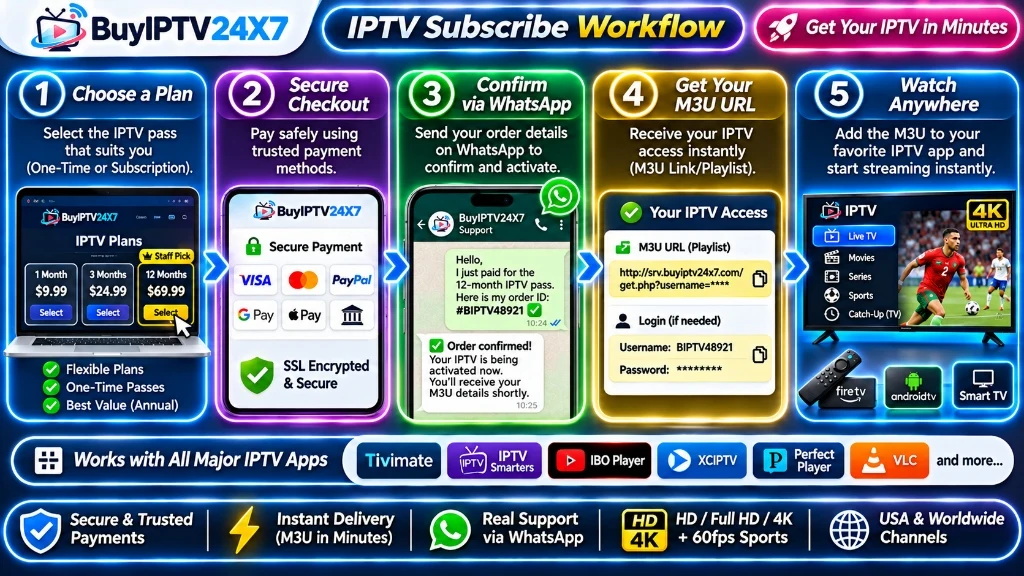
Why You Should IPTV Subscribe with One-Time Passes Instead of Recurring Traps
The most prevalent risk facing streaming consumers today involves automated monthly rebilling systems operated by offshore merchant accounts. When you sign up for a typical subscription service, your credit card credentials often pass through untrusted payment gateways that store sensitive data indefinitely. If the provider experiences unexpected server downtime or alters their channel lineup, terminating that recurring charge can prove remarkably difficult.
By contrast, purchasing a standalone one-time pass provides total fiscal control. Consider the core architectural advantages of fixed-duration access:
- Zero Unwanted Renewals: When your designated streaming period concludes (whether after one month, six months, or one year), playback simply halts unless you deliberately choose to renew. You will never encounter unexpected bank deductions.
- Isolated Payment Security: Transactions executed through direct, verified channels like WhatsApp ensure your banking details never sit on an unmonitored web database susceptible to credential stuffing or data breaches.
- Incentive for Provider Excellence: When an IPTV company knows you are not trapped in a recurring billing loop, their engineering team must maintain high server availability and continuous channel updates to earn your repeat business.
At BuyIPTV24X7, our operational model is built entirely on this customer-first philosophy. We offer standalone streaming passes ranging from $11.99 for a flexible 30-day trial to $119.99 for a comprehensive 24-month package, with direct assistance available around the clock via our official WhatsApp support line.
Step-by-Step Walkthrough to IPTV Subscribe and Activate Instant M3U Credentials
Securing your live television stream should take minutes rather than hours. Follow this verified operational sequence to register, pay, and launch your channel lineup without friction:
→ 4. Paste to Media App (TiviMate / Smarters) → 5. Sync EPG & Catch-Up (7-Day Replay Buffer) → 6. Stream 18,000+ Channels (4K / 60fps Sports)
Step 1: Evaluate Your Household Viewing Requirements
Determine how many screens will stream content concurrently and what programming matters most to your household. If your primary focus is live American sports in 60 frames per second, verify that your selected service provides redundant ingest feeds for major networks such as ESPN, Fox Sports, and regional sports networks. Explore the complete USA channels directory to confirm regional affiliate availability.
Step 2: Choose Your Duration Tier on the Official Plan Menu
Navigate to the IPTV subscription plans portal. Select the term that aligns with your budget. While a 1-month pass at $11.99 provides an ideal benchmark for network testing, annual tiers like our 1-Year pass ($69.99, equivalent to $5.83 per month) offer significant economic value and include extended 7-day Catch-Up TV access.
Step 3: Confirm Your Order via Dedicated WhatsApp Concierge
Rather than exposing personal payment cards to public online forms, initiate your order through our direct WhatsApp channel. A dedicated support agent verifies your package selection, provides secure payment instructions, and instantly generates your personalized streaming credentials.
Step 4: Import Credentials into Your Media Player
Once issued, you receive two standardized connection methods:
- Xtream Codes API: Includes a Server URL, Username, and Password. This is the recommended format for premium players like TiviMate and IPTV Smarters Pro because it automatically separates live channels, video on demand (VOD), and series into indexed databases.
- M3U Plus URL: A structured web address that points directly to your cloud-hosted playlist file, ideal for VLC Player, Kodi, or legacy hardware decoders.
BuyIPTV24X7 Subscription Tier Comparison: Choosing Your Pass
Selecting the appropriate subscription tier depends on your planned usage, seasonal sports schedules, and multi-room viewing habits. Below is an engineering comparison of the passes available directly from BuyIPTV24X7:
| Plan Duration | Upfront Price | Effective Monthly Cost | Catch-Up TV Window | Anti-Freeze Routing | Ideal User Profile |
|---|---|---|---|---|---|
| 1 Month | $11.99 | $11.99 / mo | Standard Live Only | Enabled (US & EU Nodes) | First-time testers and temporary travelers |
| 3 Months | $29.99 | $10.00 / mo | 4-Day Catch-Up Archive | Enabled (Dynamic Load Balancing) | Seasonal sports enthusiasts (NFL / NBA regular season) |
| 6 Months | $44.99 | $7.50 / mo | 7-Day Catch-Up Archive | Enabled (Multi-CDN Redundancy) | Regular household cord-cutters seeking stability |
| 1 Year (Staff Pick) | $69.99 | $5.83 / mo | 7-Day Catch-Up Archive | Priority Ultra-Low Latency | Families wanting maximum savings with 7-day refund guarantee |
| 2 Years | $119.99 | $5.00 / mo | 7-Day Catch-Up Archive | VIP Priority Cluster | Long-term power streamers demanding the absolute lowest cost |
Every tier incorporates full access to over 18,000 live international streams, more than 100 dedicated United States entertainment, news, and sports networks, and our curated library of latest on-demand movies.
Essential Hardware and Player Setup After You IPTV Subscribe
Maximizing your viewing experience requires pairing premium server streams with capable decoding hardware. An underpowered streaming stick can drop frames during high-bitrate 4K sports broadcasts, leading users to falsely blame their server connection.
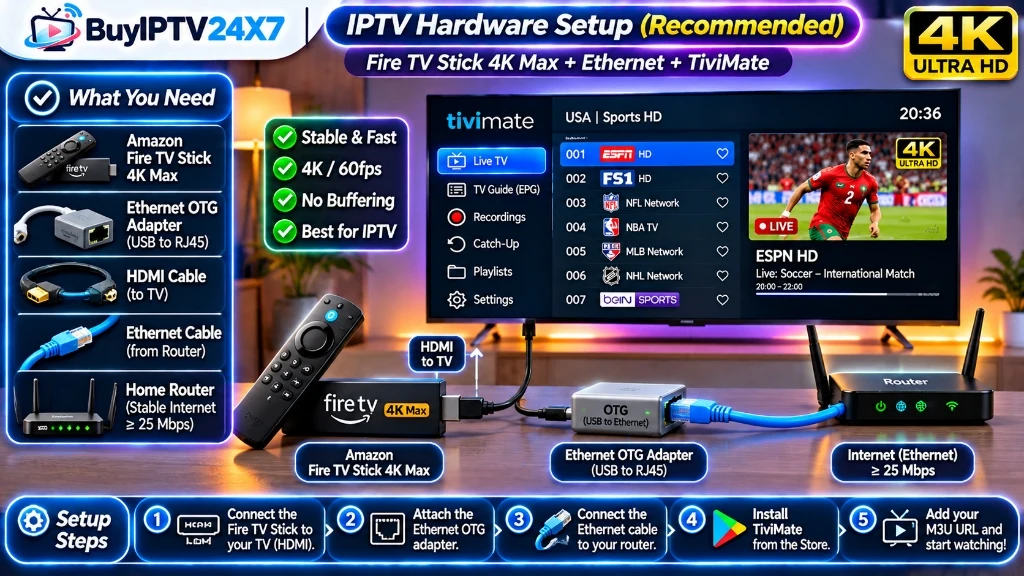
Recommended Hardware Platforms
- Amazon Fire TV Stick 4K Max (2nd Gen): Features a MediaTek MT8696T quad-core processor and 2GB of RAM with hardware decoding support for AV1, HEVC (H.265), and VP9 codecs.
- NVIDIA Shield TV Pro: The benchmark for home theater enthusiasts, powered by the Tegra X1+ processor with AI 4K upscaling, Gigabit Ethernet, and Dolby Atmos passthrough.
- Apple TV 4K (3rd Gen): Delivers unmatched raw processing power via the A15 Bionic chip, offering ultra-fluid UI navigation when running media apps like UHF or iPlayTV.
- Android TV & Google TV Smart TVs: Models manufactured by Sony, TCL, and Hisense running native Google TV allow direct app downloads without external dongles. For specialized television setup instructions, consult our supported devices overview.
Software Configuration Guidelines
For the cleanest interface and fastest electronic program guide population, download TiviMate IPTV Player (for Android and Fire OS) or IPTV Smarters Pro. When entering your Xtream Codes parameters:
- Set Stream Format to HLS (.m3u8) rather than MPEG-TS to leverage adaptive bitrate switching during momentary network jitter.
- Adjust the EPG Update Interval to every 12 hours so your guide data stays synchronized across all channel schedules.
- Set the Buffer Size to "Large" or "5 Seconds" if streaming over residential 5GHz Wi-Fi to eliminate micro-stuttering during live events.
For in-depth software walkthroughs, read our specialized TiviMate IPTV player guide and our troubleshooting resource on resolving IPTV Smarters failed to authorize errors.
Troubleshooting and Network Optimization for Subscribed Streams
Even the highest quality streams can encounter packet loss if local networking parameters are misconfigured. Implement these technical best practices to maintain consistent playback:
1. Eliminate Local Wi-Fi Interference
While modern 5GHz Wi-Fi can support 400 Mbps local bandwidth, RF reflections from walls and nearby smart home equipment introduce packet jitter. For 4K streams with 25 Mbps bitrates, a hardwired Ethernet connection using a Cat6 cable or USB Ethernet OTG adapter provides zero packet loss and rock-solid latency stability.
2. Bypass ISP Bandwidth Throttling
During high-profile sporting events (such as Sunday NFL broadcasts or Champions League finals), residential internet service providers (ISPs) often deploy Deep Packet Inspection (DPI) to identify UDP and HTTP video streams, deliberately throttling bandwidth to conserve network capacity. If you observe buffering during major live broadcasts despite passing speed tests:
- Switch your device DNS from ISP default to Cloudflare (
1.1.1.1and1.0.0.1) or Google (8.8.8.8). - Connect through a high-throughput VPN using the WireGuard protocol to encapsulate your stream traffic in encrypted UDP packets that bypass ISP inspection filters.
3. Clear App Cache and Reset Decoders
Over time, downloaded EPG logos and channel previews accumulate in local flash storage. In your player settings, navigate to Settings > Clear Cache. If a channel produces audio without video, toggle your player decoder from Hardware to Software (or vice versa) to resolve codec handshake conflicts.
For comprehensive network diagnostics, review our dedicated IPTV service USA guide.
Subscribe Safely with Zero Recurring Contracts
Choose a transparent one-time pass starting at $11.99 and get your instant M3U & Xtream Codes credentials via WhatsApp.
Frequently Asked Questions About How to IPTV Subscribe
Can I test the service before purchasing a long-term pass?
Yes. Our 1-month pass at $11.99 functions as an affordable, full-access test drive. You receive identical server priority, 4K stream access, and complete international lineups without long-term commitment.
What payment methods are accepted through WhatsApp?
Our team supports a variety of secure global transaction methods including PayPal, major credit cards via encrypted one-time payment links, and cryptocurrency. Contact our WhatsApp support team to receive immediate checkout details tailored to your country.
How does the 7-day refund guarantee operate on annual plans?
If you purchase our 1-Year pass ($69.99) and experience technical incompatibility or server dissatisfaction within the first seven calendar days, our team will troubleshoot your connection or issue a prompt refund upon request.
Is Catch-Up TV included across all channels?
Catch-Up TV is available on hundreds of premier United States, United Kingdom, and international networks, allowing you to replay live broadcasts from the preceding 4 to 7 days directly from your electronic program guide.
Conclusion: Take Control of Your Television Entertainment
Transitioning to internet protocol television should liberate you from rigid cable contracts and overpriced monthly equipment rentals. When you choose to iptv subscribe through BuyIPTV24X7, you secure access to a world-class streaming infrastructure engineered for high availability, 4K picture fidelity, and absolute billing peace of mind.
Ready to transform your home entertainment? Visit our official plans page or message our concierge directly on WhatsApp to activate your credentials today.