
True IPTV 4K streaming delivers four times the pixel density of standard 1080p Full HD (3840x2160 versus 1920x1080), bringing sharp stadium turf, crisp scoreboards, and cinema-grade movie detail to modern OLED and QLED televisions. Achieving smooth 4K playback without constant spinning buffers requires matching three elements correctly: a provider sending genuine HEVC 4K feeds, sustained home download headroom (40 to 50 Mbps), and streaming hardware with dedicated H.265 decoding chips.
Many cord-cutters buy a massive 65-inch or 75-inch 4K television yet still end up watching blurry streams or stuttering sports because one weak link in their Wi-Fi, HDMI setup, or provider routing chokes the stream.
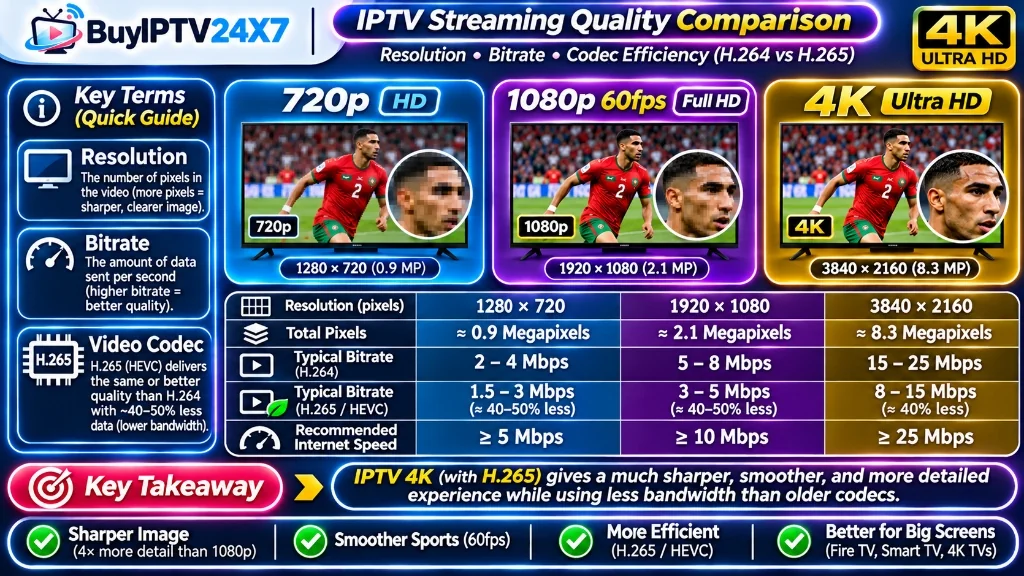
At BuyIPTV24X7, every pass includes Standard 4K Access across live channels and VOD. Here is the exact technical checklist to get crisp, uninterrupted 4K video in your living room.
Resolution, Bitrate & Internet Speed Requirements for IPTV 4K
Live 4K television consumes dramatically more data than basic 720p or 1080p streams because each frame carries over 8.2 million pixels. If multiple people browse phones, play online games, or upload backups on your home Wi-Fi simultaneously, your TV needs spare bandwidth margin above the raw video stream.
| Stream Tier | Pixel Dimensions | Typical Stream Bitrate | Minimum Speed Needed | Recommended TV Speed |
|---|---|---|---|---|
| Standard HD (720p) | 1280x720 |
3.5 to 5 Mbps | 10 Mbps | 15 Mbps |
| Full HD (1080p 30fps) | 1920x1080 |
6 to 9 Mbps | 15 Mbps | 25 Mbps |
| Full HD Sports (1080p 60fps) | 1920x1080 |
10 to 16 Mbps | 25 Mbps | 35 Mbps |
| IPTV 4K Ultra HD (2160p 60fps) | 3840x2160 |
20 to 30 Mbps | 40 Mbps | 50+ Mbps (Wired or 5 GHz Wi-Fi) |
Remember that web speed tests on your laptop often report best-case multi-connection speeds to a nearby ISP node. Always run a speed test directly on your TV or Firestick (using an app like Analiti) to verify real single-stream throughput at your living-room HDMI port.
True 4K vs. Upscaled 1080p: Why H.265 (HEVC) Matters
Not every channel labeled "UHD" by bargain providers is genuine 4K. Budget services sometimes take a compressed 1080p signal, stretch the frame dimensions, and label it 4K while keeping bitrates low, leaving muddy shadows and banding artifacts.
Genuine 4K live channels and movies rely on H.265 / HEVC (High Efficiency Video Coding) rather than older H.264 compression:
- Half the Bandwidth Cost: H.265 packs the same visual detail into roughly 40% to 50% fewer megabits than H.264, making real-time 2160p streaming practical over normal residential broadband.
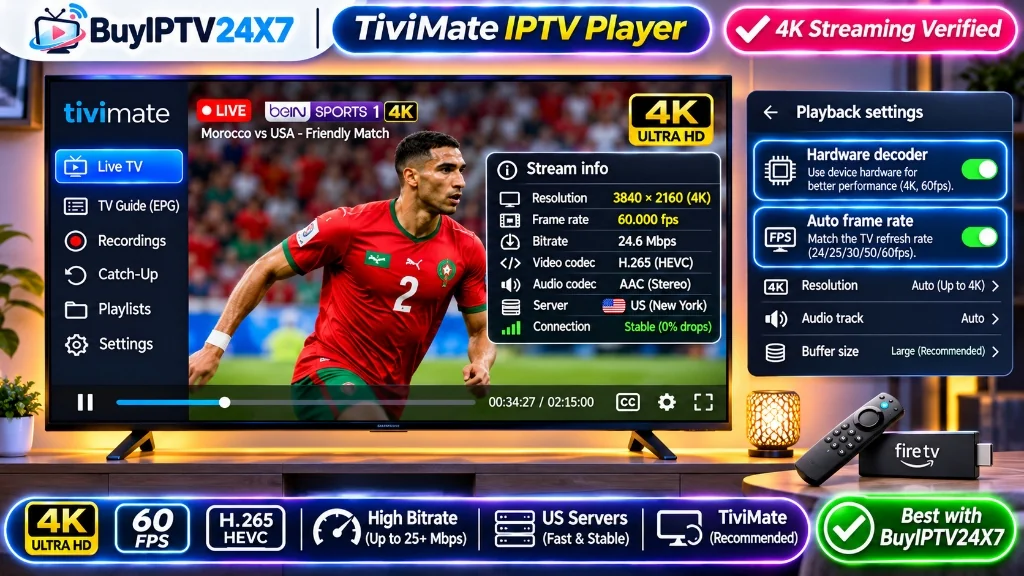
- How to Verify Real 4K in Your Player: Inside apps like TiviMate, press OK/Select while watching a broadcast and read the info bar at the bottom. True 4K streams display
3840x2160alongside50fpsor60fpson live sports and24fpson cinema VOD. On BuyIPTV24X7, our most streamed true 4K feeds include live international soccer on beIN Sports 4K, marquee Sunday football on FOX Sports 4K, Sky Sports Main Event UHD, and newly released 4K HDR theatrical releases in our on-demand cinema section.
Best Hardware & Display Settings for 4K Playback
Because decoding 4K H.265 video at 60 frames per second takes dedicated silicon, older 1080p sticks or budget Smart TVs often stutter or go silent on 4K audio tracks.
Recommended 4K Streaming Devices
- Amazon Fire TV Stick 4K & 4K Max: Compact, affordable, and equipped with hardware HEVC decoding that runs both IPTV Smarters Pro and TiviMate smoothly.
- Nvidia Shield TV Pro: Top-tier Tegra graphics processor with AI-enhanced upscaling that sharpens regular 1080p sports feeds onto 4K OLED screens.
- Apple TV 4K: Ultra-fast A-series chip with reliable Ethernet ports and clean tvOS playback apps.
- Modern Samsung QLED & LG OLED TVs: Native 4K panels run IBO Player or IPTV Smarters Pro cleanly, provided you connect a wired Ethernet cable or strong 5 GHz Wi-Fi.
Verify exact model support on the BuyIPTV24X7 Supported Devices page before configuring your living room.
Four Settings That Stop 4K Stuttering
- Keep Video Decoder on Hardware (
Settings > Playback): Software CPU decoding cannot sustain3840x2160at 60fps on streaming sticks and will drop half the frames. Always ensure Hardware decoding is active for video. - Enable Auto Frame Rate (AFR): Turning on AFR allows your streaming box to switch your TV panel's refresh rate automatically between 24Hz (cinema) and 60Hz (live sports), preventing jerky panning shots.
- Set Player Buffer Size to Small or Normal: A tiny 2-to-3 second buffer protects 4K streams against brief wireless spikes without slowing down channel switching.
- Use 5 GHz Wi-Fi or Wired Ethernet: The older 2.4 GHz Wi-Fi band tops out around 35 to 50 Mbps in real homes and suffers interference from neighbors. Switch to 5 GHz Wi-Fi or add an Ethernet adapter directly into your streaming stick.
For player-specific walkthroughs, check our TiviMate IPTV Player Guide and Setup & Installation Guides.
Where to Find 4K Live Channels & VOD on BuyIPTV24X7
Every plan on BuyIPTV24X7 unlocks standard 4K access alongside HD and Full HD channels, optimized US routing, and full EPG support:
- Live Sports & USA Networks: Explore 18,000+ live streams and 100+ premier US networks in our USA Channel Directory.
- 4K Movies & Binge-Worthy Series: Preview trending theatrical titles in the Latest Movies & VOD Catalog.
- Flexible One-Time Passes: Start with 1 Month ($11.99) to verify 4K speed on your television, or lock in 1 Year ($69.99 Staff Pick) with 7-day Catch-Up TV and a 7-day refund policy.
Compare all packages on BuyIPTV24X7 Plans or explore our Best IPTV USA Review and IPTV Service Guide.
Experience True 4K 60fps IPTV on Your Television
Message our team on WhatsApp for instant 4K access, device configuration help, and zero-risk one-time passes.
Frequently Asked Questions
What internet speed is required for buffer-free IPTV 4K streaming?
Plan for 40 to 50 Mbps of consistent download speed at your TV or streaming stick for a single 4K Ultra HD stream. That gives plenty of headroom above the 20 to 30 Mbps raw stream bitrate so household phones do not trigger buffering.
How can I check if a channel is real 4K or upscaled 1080p?
Open the playback info overlay in your player (press OK/Select in TiviMate). Genuine 4K streams report 3840x2160 pixel dimensions rather than 1920x1080 or 1280x720.
Do older streaming sticks struggle with IPTV 4K channels?
Yes. Standard 1080p sticks and older Smart TVs often lack fast hardware H.265 (HEVC) decoders, causing choppy frames or silent audio on 4K broadcasts. Upgrading to a Fire TV Stick 4K Max, Apple TV 4K, or Nvidia Shield TV resolves hardware bottlenecks immediately.
Why do 4K streams buffer in the evening when my morning speed test was fast?
Two culprits cause evening 4K buffering: either your local 2.4 GHz Wi-Fi gets congested when family members stream simultaneously, or your ISP throttles streaming ports between 7:00 PM and 11:00 PM. Testing wired Ethernet or switching to 5 GHz Wi-Fi solves local congestion right away.
Are 4K channels included in BuyIPTV24X7's 1-Month $11.99 plan?
Yes. Every tier from 1 Month ($11.99) through 2 Years ($119.99) includes 1 Active Connection with Standard 4K Access, optimized US routing, and full EPG.