
High-performance iptv streaming has revolutionized home entertainment by delivering crisp 4K video feeds and instant live channel switching straight over standard residential broadband. Yet for millions of cord-cutters, the excitement of cutting the cable cord quickly gives way to frustration when a crucial live sporting event freezes in the final two minutes, replaced by a spinning buffer circle.
Buffering is not an inevitable reality of internet protocol television. It is an engineering problem caused by misconfigured player caches, local Wi-Fi packet collisions, or aggressive ISP bandwidth throttling. In this authoritative technical blueprint, our lab outlines the exact steps required to eliminate stream stutter, configure player buffers, select the right hardware decoders, and unlock the full potential of BuyIPTV24X7's 18,000+ live channel network.
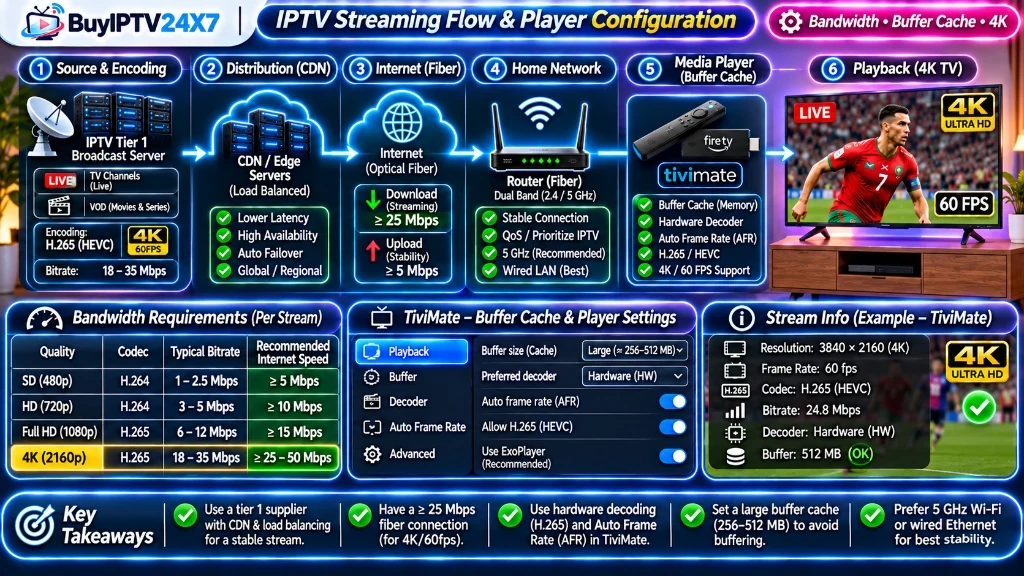
Understanding the Core Architecture of Modern IPTV Streaming Networks
To solve streaming bottlenecks, you must understand how live television data travels from a broadcast studio to your television screen. Unlike on-demand video services like Netflix or YouTube, which can download minutes of future video in advance, live television broadcasts are generated in real time.
→ 4. Local Player Cache (3,000 - 5,000ms Buffer) → 5. Hardware Decoding (MediaCodec / GPU) → 6. 4K 60fps Display (Zero Stutter)
- Ingest and Digitization: Professional satellite transceivers and dedicated optical fiber downlinks capture raw broadcast signals from premier television networks.
- Real-Time Transcoding: High-density hardware encoders compress video into standard H.264/AVC or high-efficiency H.265/HEVC bitstreams, packaging them into HTTP Live Streaming (HLS) or MPEG-TS container chunks.
- Edge Distribution: Enterprise content delivery networks (CDNs) distribute video segments across hundreds of geographically distributed data center nodes.
- Client-Side Assembly: Your media player (such as TiviMate or IPTV Smarters) downloads continuous 2-second to 6-second video segments, stores them in RAM cache, decodes the frames using your device GPU, and renders them seamlessly on screen.
When any single link in this chain experiences delay exceeding your local buffer capacity, playback stalls.
Optimizing Your Network and Hardware for High Bitrate IPTV Streaming
The vast majority of streaming interruptions occur within the final fifty feet of the delivery path: your home local area network (LAN) and playback device. Implement these empirical network improvements to achieve flawless stream stability:
1. Upgrade from Wi-Fi to Hardwired Ethernet
Even high-speed Wi-Fi 6 routers are vulnerable to environmental interference. Wall studs, metallic appliances, and competing 5GHz radio frequencies introduce micro packet loss. A single dropped TCP packet requires retransmission; if retransmission takes longer than your player buffer duration, the video halts.
- Connect your streaming device directly to your router using a shielded Cat6 Ethernet cable.
- If using an Amazon Fire TV Stick, purchase an official Amazon Ethernet Adapter or an OTG Gigabit USB adapter. Hardwired connections drop packet loss from 2–5% down to a rock-solid 0.0%.
2. Configure Custom DNS Servers
Residential internet service providers frequently use sluggish, overburdened DNS servers that introduce latency during initial channel handshakes. Furthermore, many ISPs inject DNS filtering that blocks known streaming domains. Replace default ISP DNS addresses with high-throughput public resolvers:
- Cloudflare: Primary
1.1.1.1| Secondary1.0.0.1 - Google Public DNS: Primary
8.8.8.8| Secondary8.8.4.4
3. Select Capable Playback Hardware
Low-end streaming dongles equipped with quad-core Cortex-A53 processors and 1GB of RAM struggle to decode 4K 60fps HEVC streams with high color bit depths. For the smoothest experience, choose hardware capable of native hardware decoding:
- NVIDIA Shield TV Pro: The undisputed king of home theater streaming with 3GB of RAM and AI upscaling.
- Amazon Fire TV Stick 4K Max (2nd Gen): Outstanding value, featuring 2GB of RAM, Wi-Fi 6E, and full AV1/HEVC hardware decoding.
- Apple TV 4K: Extremely powerful A15 processor with instant channel switching times.
Explore our full list of supported devices and hardware recommendations.
Fine-Tuning IPTV Player Buffer Size and Video Decoders
Your media player software contains several critical configuration parameters that directly dictate how gracefully it handles momentary network fluctuation.
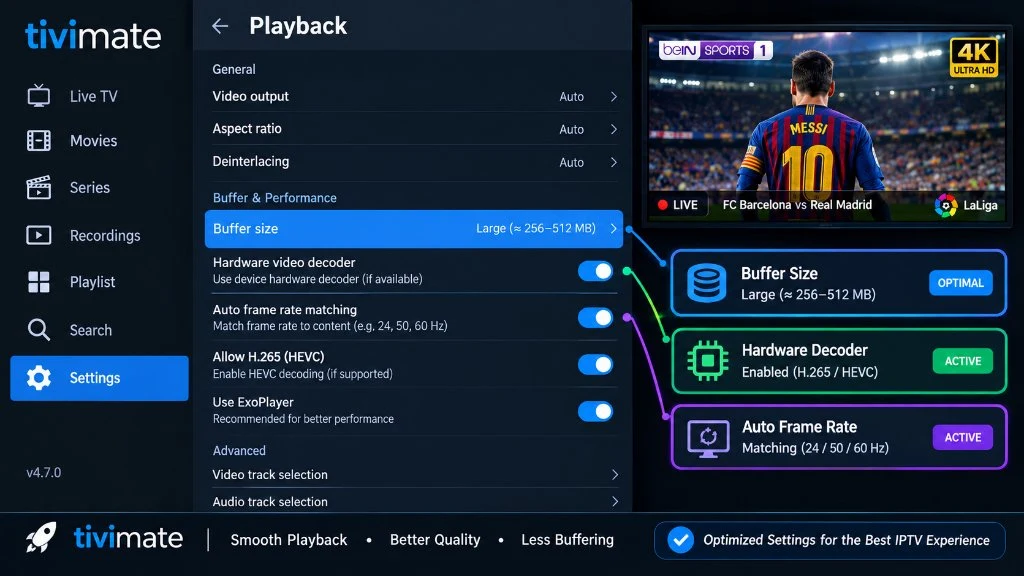
Recommended Settings for TiviMate and IPTV Smarters
- Buffer Size Allocation: Default setting is often "None" or "Small" (500ms to 1000ms), intended to make channel changes feel instantaneous. However, an undersized buffer cannot withstand brief broadband latency spikes. Adjust Buffer Size to Large (or 3 to 5 seconds) so your stream becomes virtually immune to random micro-freezes.
- Video Decoder Selection: Always choose Hardware Decoder (MediaCodec) over Software Decoder. Hardware decoding delegates video decompression directly to the GPU system-on-a-chip, keeping CPU usage below 15% and preventing thermal throttling.
- Audio Output Settings: Enable Audio Passthrough if connected to an external AV receiver or soundbar. This offloads Dolby Digital / AC3 processing directly to your sound system, freeing up device resources.
For detailed setup instructions on specific applications, read our comprehensive TiviMate IPTV player guide and our guide on configuring an internet protocol television service.
Content Selection and Premium Viewing Tiers on BuyIPTV24X7
High-quality stream reception begins with a world-class broadcast feed. At BuyIPTV24X7, our server infrastructure is engineered specifically for uncompromising sports, news, and cinema delivery:
| Subscription Plan | Upfront Cost | Monthly Rate | Stream Bandwidth Tier | Catch-Up Coverage | Ideal Use Case |
|---|---|---|---|---|---|
| 1-Month Pass | $11.99 | $11.99 / mo | Standard CDN Egress | Live Only | Short-term testing and traveling |
| 3-Month Pass | $29.99 | $10.00 / mo | Priority Load Balanced | 4-Day Catch-Up | Sports season streaming |
| 6-Month Pass | $44.99 | $7.50 / mo | Multi-CDN Redundancy | 7-Day Catch-Up | Regular cord-cutting households |
| 1-Year Pass (Staff Pick) | $69.99 | $5.83 / mo | VIP Ultra-Low Latency | 7-Day Catch-Up | Best overall value + 7-day refund guarantee |
| 2-Year Pass | $119.99 | $5.00 / mo | VIP Priority Cluster | 7-Day Catch-Up | Maximum long-term savings |
Every pass includes access to our full suite of 18,000+ live channels, hundreds of premier USA cable networks, and an on-demand catalog of the latest cinema movies.
Security, Privacy, and Eliminating ISP Throttling During Live Events
A frequent source of mysterious buffering occurs when your internet service provider actively targets your streaming session. During Sunday NFL kickoffs, Premier League derbies, or pay-per-view boxing events, ISPs experience massive surges in network congestion. To manage bandwidth, automated traffic-shaping algorithms deploy Deep Packet Inspection (DPI) to identify continuous UDP streaming traffic and throttle those connections to sub-broadband speeds.
How to Bypass ISP Throttling
- Deploy a High-Performance VPN: Encrypting your internet connection with a modern VPN protocol like WireGuard or OpenVPN UDP wraps your video traffic in an encrypted tunnel. Your ISP can only see generic encrypted packets traveling to a secure VPN server, preventing automated traffic throttling.
- Select Local VPN Endpoints: Always connect to a VPN server geographically close to your physical location (under 150 miles) to minimize latency overhead.
- Verify WireGuard Speeds: WireGuard introduces less than 3% encryption overhead, ensuring you retain the full 25+ Mbps throughput needed for 4K 60fps streaming.
Check out our related analysis on IPTV service USA options for more ISP privacy tips.
Say Goodbye to Buffering Forever
Test our anti-freeze US/EU CDN clusters on 18,000+ live HD & 4K channels with a standalone $11.99 pass.
Frequently Asked Questions About High-Definition IPTV Streaming
What is the minimum internet speed required for smooth IPTV streaming?
For standard definition (SD), 5 Mbps is sufficient. High definition (1080p 60fps) requires a stable 12 to 15 Mbps connection, while 4K streaming demands a consistent 25 to 30 Mbps per active screen.
Can I watch Catch-Up TV if I missed a live broadcast?
Yes. On our 3-month, 6-month, 1-year, and 2-year access passes, BuyIPTV24X7 provides an integrated cloud Catch-Up archive spanning 4 to 7 days, allowing you to replay your favorite shows and sports events directly from the electronic program guide.
Why do some channels load instantly while others take three seconds?
Channel switching latency depends on the keyframe interval (GOP size) configured on the broadcast encoder. Our primary sports and news networks feature tight 1-second keyframe intervals for fast tuning.
How do I purchase a streaming pass securely?
BuyIPTV24X7 processes orders through a dedicated, secure WhatsApp concierge. This ensures your payment information is never stored online and allows our engineers to verify your setup in real time.
Conclusion: Achieve the Ultimate Buffer-Free Viewing Experience
Experiencing stutter-free, high-definition television over broadband is no longer a matter of luck. By optimizing your local network with Ethernet, configuring adequate player buffer caching, and partnering with an enterprise provider like BuyIPTV24X7, you can unlock smooth iptv streaming every day of the year.
Ready to say goodbye to buffering? Review our subscription passes or reach out to our streaming engineers on WhatsApp to activate your account today.