
An Internet Protocol Television service (IPTV) is a digital media delivery system that transmits live television channels, time-shifted Catch-Up broadcasts, and on-demand movies directly over IP broadband networks rather than traditional radio-frequency cable, satellite dishes, or over-the-air antennas. Instead of broadcasting hundreds of unused signals into your wall outlet continuously, IP television streams only the exact channel or movie packet stream your television app requests in real time.
For beginners replacing a traditional cable box, understanding the basic architecture behind IPTV clarifies why internet speed, player software, and US server routing matter so much more than coaxial wiring.
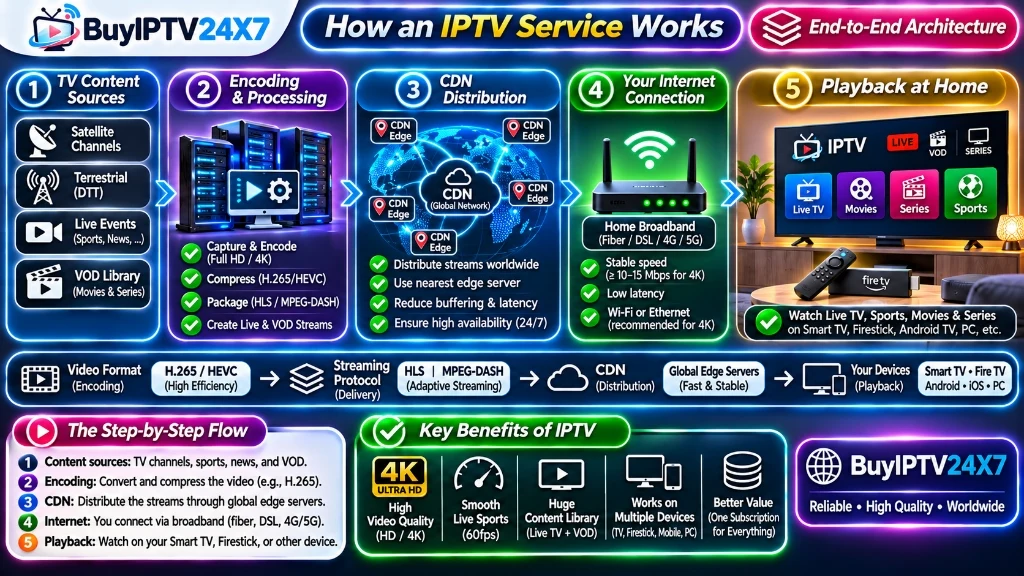
This foundational guide from BuyIPTV24X7 breaks down the three core IPTV delivery formats, explains how video moves from broadcast headends to your remote control, and compares IP television directly with legacy cable and satellite TV.
Key Facts: How IP Television Delivers Video
| Core Component | Role in an IPTV System | Consumer Example |
|---|---|---|
| Video Source & Encoder | Captures live broadcast feeds and compresses video into H.264/H.265 IP packets | Satellite/network sports feed encoded at 1080p60 or 4K |
| Server Routing / CDN | Distributes video chunks across regional edge nodes to minimize latency | BuyIPTV24X7 optimized US server routing |
| Delivery Protocols | Packages video into HLS (.m3u8), MPEG-TS (.ts), and Xtream Codes APIs |
Separate live TV, VOD, and 7-day EPG schedules |
| Client Media Player | Software interface on your screen that decodes streams and displays the guide | TiviMate, IPTV Smarters Pro, XCIPTV, or IBO Player |
The Three Formats of an Internet Protocol Television Service
Every modern IP television platform organizes content into three complementary viewing modes rather than forcing viewers to rely strictly on scheduled air times:
1. Live Television Streaming (Real-Time Broadcasts)
Live channels work just like cable television, delivered over HTTP Live Streaming (HLS) or MPEG transport streams instead of coaxial wire. Viewers tune into live sports (ESPN, NFL RedZone, NBA TV, FS1), breaking news (CNN), and local affiliates (ABC, CBS, NBC, FOX) using a clickable Electronic Program Guide (EPG).
2. Time-Shifted Media (Catch-Up TV)
Catch-Up TV automatically archives recent live broadcasts on the provider's servers for a set window, typically 4 to 7 days. If you miss a late-night game or morning broadcast, you scroll backward on the EPG grid and play it immediately without programming a local hard-drive DVR beforehand.
3. Video on Demand (VOD Movies & Series)
VOD works like a built-in streaming library inside the exact same player app. You pick theatrical movies or full TV seasons from poster catalogs and control playback with pause, rewind, and multi-language subtitles anytime. Preview what a modern catalog looks like on the BuyIPTV24X7 Latest Movies page.
Behind the Scenes: How a Stream Reaches Your TV in Seconds
When you press Select on a channel inside Firestick or Smart TV, four network handshakes happen almost instantly:
- API Authentication: Your player app (such as IPTV Smarters Pro or TiviMate) sends your private Xtream Codes username and password to the provider's server to verify an active pass and connection allowance.
- Manifest Retrieval: The server returns a dynamic stream address pointing to an optimized edge server node along with updated XMLTV guide entries.
- Segmented Packet Transfer: Video flows in tiny continuous segments (typically 2 to 6 seconds per chunk in HLS). Your app builds a brief 2-to-3 second buffer in device memory so tiny fluctuations on your home Wi-Fi pass unnoticed.
- Hardware Decoding: Your streaming box's GPU chip decodes the compressed H.265/HEVC packets into crisp 1080p 60fps or 4K images directly on your HDMI display.
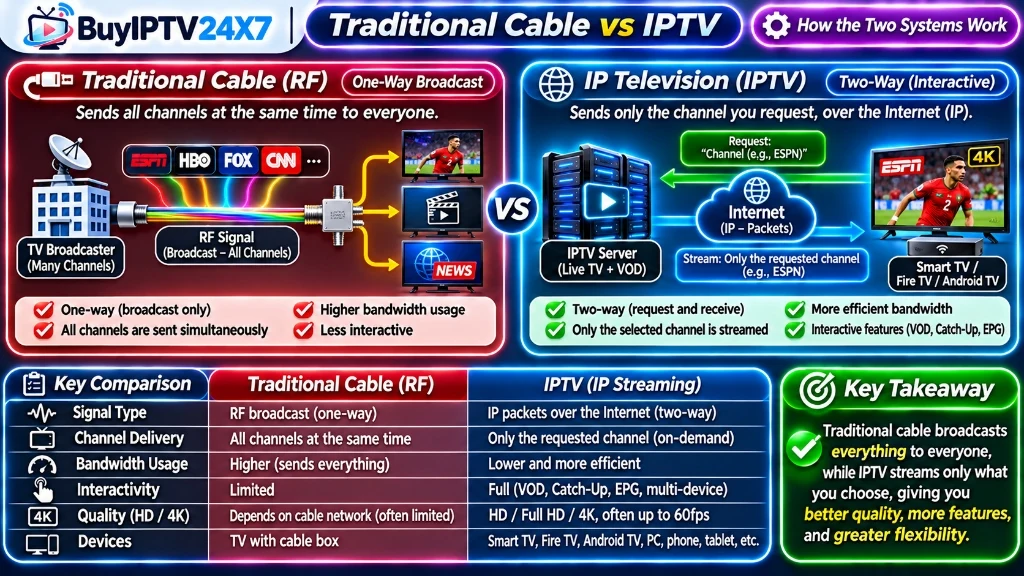
IP Television vs. Cable, Satellite & Over-the-Air Antennas
| Comparison Factor | Internet Protocol Television (IPTV) | Cable & Satellite TV | Over-the-Air (OTA) Antenna |
|---|---|---|---|
| Signal Medium | Broadband IP internet | Buried coaxial / satellite dish | Local VHF/UHF radio waves |
| Hardware Requirement | Firestick, Smart TV, Apple TV, phone | Rented proprietary cable boxes | Roof/window antenna + coax |
| Channel & VOD Scale | 18,000+ live streams + full VOD | 100 to 300 channels (tiered fees) | 15 to 60 free local stations only |
| Portability | Watch anywhere with Wi-Fi (1 screen at a time) | Locked to home address wiring | Local reception radius only |
| Typical US Monthly Cost | $5.00 to $11.99 / mo (one-time passes) | $120 to $180+ / mo + contracts | Free after antenna purchase |
What You Need to Start Using IPTV at Home
Getting started requires zero wall drilling or technician appointments. Four simple items get your living room running in under five minutes:
- Stable Home Broadband: Maintain at least 25 Mbps sustained download speed for smooth 1080p 60fps sports, or 40 to 50 Mbps for IPTV 4K playback.
- A Compatible Screen or Streaming Stick: Use an Amazon Fire TV Stick, Android TV box, Apple TV, Samsung or LG Smart TV, or Windows/Mac laptop. Check the complete list on Supported Devices.
- A Trusted Client Player: Install IPTV Smarters Pro, TiviMate, or XCIPTV following our visual walkthroughs at BuyIPTV24X7 Setup Guides.
- Verified Provider Credentials: Connect a private pass rather than unreliable free links. When new cord-cutters message our 24/7 WhatsApp support desk, the number-one question is always: "Will I lose my local channels or sports games if I cancel cable?" We show them directly how our USA channel lineup includes all local broadcast affiliates (ABC, CBS, NBC, FOX) alongside ESPN, NFL RedZone, and regional sports networks, streaming in crisp 1080p60 and 4K without requiring technician visits or coaxial cables.
Transitioning from Cable to BuyIPTV24X7
Once you understand how IP television works, moving away from expensive cable contracts is simple. BuyIPTV24X7 delivers 18,000+ live streams, 100+ premier US broadcast and sports networks, 7-day EPG, and 4-to-7 day Catch-Up TV through transparent one-time WhatsApp passes:
- Low-Risk 1-Month Trial ($11.99 one-time): Test live sports and VOD across your home network without contracts.
- 1-Year Staff Pick ($69.99 / $5.83 mo): Save 51% with full EPG, 7-day Catch-Up TV, priority WhatsApp support, and a 7-day refund policy.
Explore our USA Channel Directory, read our complete IPTV Service Buyer's Guide and IPTV Subscription Guide, or message our WhatsApp Support Team for beginner-friendly device setup help.
Switch from Cable to High-Definition IP Television
Message our desk on WhatsApp for immediate Xtream Codes credentials, device walkthroughs, and risk-free one-time passes.
Frequently Asked Questions
What does Internet Protocol Television (IPTV) mean?
Internet Protocol Television (IPTV) means delivering live TV, Catch-Up replays, and on-demand video over your internet connection using IP packets rather than traditional cable wires, satellite dishes, or antennas.
How is IP television different from traditional cable or satellite TV?
Cable and satellite push every channel down dedicated lines continuously and require rented boxes. IP television sends only the exact channel stream you click over your broadband router to your Firestick, Smart TV, or mobile app.
What equipment do I need to start streaming IPTV at home?
You need broadband internet (25 Mbps+ for HD 60fps, 40 to 50 Mbps+ for 4K), a compatible streaming device or Smart TV, a player app like IPTV Smarters Pro or TiviMate, and login credentials from a provider.
Does IPTV include local channels and live sports?
Yes. Providers tailored for US households such as BuyIPTV24X7 include ABC, CBS, NBC, FOX, CNN, HBO, and major US sports networks including ESPN, NFL RedZone, NBA League Pass, MLB Network, and UFC.
Where can I get answers to common beginner questions?
Check our Frequently Asked Questions page or chat directly with our 24/7 WhatsApp Desk before ordering.