
Investing in a dedicated hdmi iptv encoder allows content creators, hospitality managers, and broadcast engineers to transform uncompressed HDMI video feeds into low-latency IP streams. Whether you are distributing closed-circuit sports in a sports lounge, broadcasting religious services across a multi-campus sanctuary, setting up an in-house hotel television headend, or streaming high-frame-rate computer feeds to remote displays, hardware encoding provides stability and efficiency that software applications running on desktop PCs cannot match.
While consumer streaming often focuses solely on playback apps and media players, the ingest side of digital television is anchored by hardware encoding appliances. In this comprehensive technical guide, our lab breaks down the physical architecture, network protocols, codec trade-offs, and configuration workflows needed to build a professional IPTV transmission pipeline, and how to seamlessly integrate local feeds with cloud services from BuyIPTV24X7.
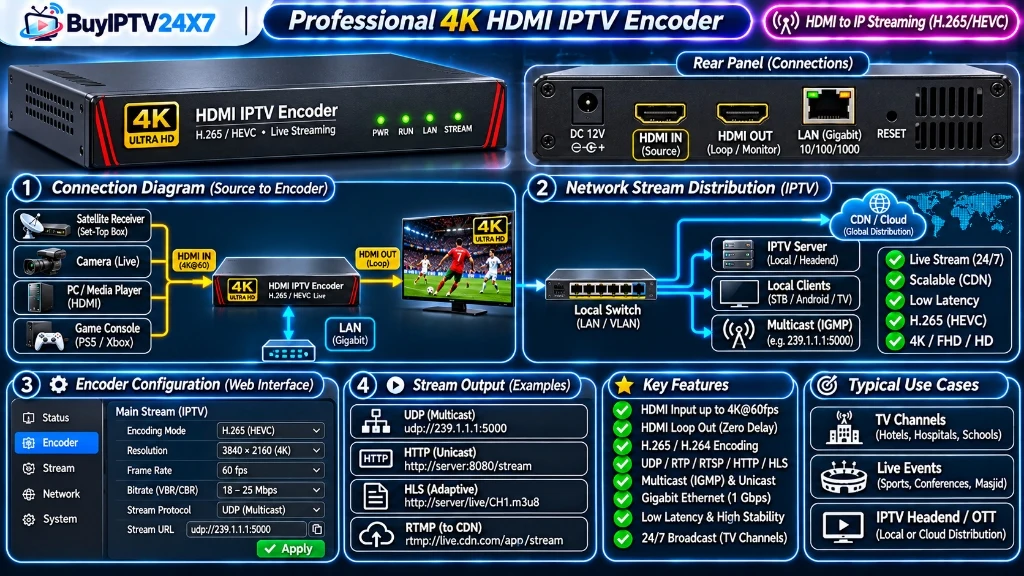
How a Dedicated HDMI IPTV Encoder Converts Local HDMI Sources into IP Streams
To understand why a dedicated hardware encoder is essential for mission-critical video, one must evaluate the massive data rate of uncompressed HDMI video. A standard 1080p 60fps uncompressed video feed produces nearly 3 Gigabits per second of raw pixel data, while 4K UHD video exceeds 12 Gbps. Transporting raw video across standard local area networks is impossible without heavy compression.
A dedicated hardware encoder contains specialized digital signal processors (DSPs) and application-specific integrated circuits (ASICs) designed exclusively for real-time video compression:
→ Protocol Packaging (RTMP / RTSP / UDP / HLS) → Network Switch / Multicast (VLAN / IGMP Snooping) → Local Client Display (Smart TV / TiviMate)
- Physical Video Ingest: The appliance receives uncompressed digital video and multi-channel audio over an HDMI 2.0 or 2.1 interface.
- Color Space Conversion and De-interlacing: Incoming signals (often RGB or YCbCr 4:4:4) are converted to broadcast-standard YUV 4:2:0 subsampling, eliminating redundant color data that human vision cannot perceive.
- Hardware Codec Compression: The video frames pass through high-density silicon engines that calculate motion vectors, discrete cosine transforms (DCT), and quantization matrices to generate H.264/AVC or H.265/HEVC bitstreams.
- Network Protocol Packaging: The compressed elementary stream is multiplexed with AAC or MP3 audio into MPEG-TS containers and dispatched across your local Ethernet switch via UDP Multicast, RTSP, RTMP, or HTTP Live Streaming (HLS).
Because this entire pipeline is executed on dedicated silicon, end-to-end encoding latency is kept under 200 milliseconds without burdening external computers.
Hardware Specifications to Look for in a Commercial HDMI IPTV Encoder
Selecting the right hardware appliance requires matching your broadcast requirements with appropriate silicon capabilities. Below is an engineering comparison of the primary encoder classes available on the market:
| Encoder Class | Supported Input Formats | Video Codecs | Network Protocols | Max Output Bitrate | Typical Application |
|---|---|---|---|---|---|
| Single-Channel 1080p | HDMI 1.4 (up to 1080p 60fps) | H.264 / AVC | RTSP, RTMP, HTTP, UDP | 16 Mbps | House of worship, school announcements, CCTV |
| 4K UHD Broadcast | HDMI 2.0 (up to 3840x2160 60fps) | H.265 / HEVC & H.264 | SRT, RTMP, RTSP, HLS, UDP | 32 Mbps | Sports bars, live event production, esports |
| Multi-Channel Blade | 4 to 16 HDMI Inputs in 1U Rack | H.264 / H.265 selectable | UDP Multicast, RTP, HTTP | 120 Mbps Aggregate | Hotel TV headends, corporate campuses, hospitals |
| Wireless Portable | HDMI + SDI with Battery Mount | H.264 / H.265 (Low Latency) | RTMP, SRT, NDI|HX | 20 Mbps | Field broadcasting, news ENG cameras, live drone video |
Key Architectural Features to Prioritize
- HDMI Loop-Through Port: An integrated HDMI passthrough port allows you to connect a local monitor without requiring an external HDMI splitter, ensuring zero latency on the operator display.
- Support for SRT (Secure Reliable Transport): SRT incorporates packet recovery and encryption, making it ideal for sending high-bitrate video feeds over unpredictable public internet connections to remote facilities.
- Power over Ethernet (PoE): Eliminates the need for external 12V power bricks by drawing operating power directly from a managed network switch.
Step-by-Step Setup: From Physical HDMI Input to Local Network Multicast
Deploying a hardware encoder into your existing network infrastructure is straightforward when adhering to standard IP broadcast protocols. Follow this operational walkthrough:
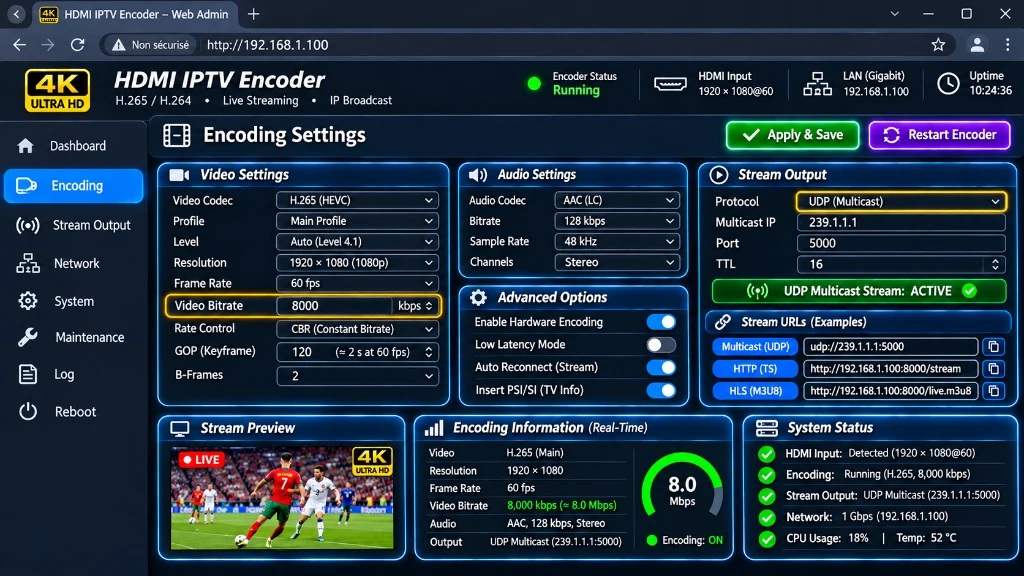
Step 1: Connect Physical Cabling
- Connect your video source (such as a 4K camera, gaming console, or broadcast receiver) to the HDMI IN port using a high-speed certified HDMI cable.
- Connect an Ethernet patch cable from the encoder's Gigabit LAN port to a dedicated port on your managed network switch.
- If local monitoring is needed, connect a display to the HDMI LOOP port.
Step 2: Access the Web Administration Dashboard
Most commercial encoders default to a static IP address (such as 192.168.1.168) out of the box. Set your computer's network interface to the same subnet (e.g., 192.168.1.100), open a web browser, and log into the administrative interface.
Step 3: Configure Encoding Parameters
- Video Codec: Select H.265 (HEVC) if streaming to modern smart TVs or Firesticks; select H.264 if supporting legacy set-top boxes.
- Bitrate Rate Control: Choose CBR (Constant Bitrate) for live broadcasts to maintain predictable bandwidth consumption. For 1080p 60fps, set the bitrate between
6,000and8,000 kbps. For 4K 60fps, configure16,000to22,000 kbps. - GOP (Group of Pictures) Size: Set the keyframe interval to double your framerate (e.g., a GOP of 60 for a 30fps stream, or 120 for 60fps). This establishes a 2-second keyframe rhythm that enables rapid channel switching on client media players.
Step 4: Dispatch the Network Stream
Enable your desired broadcast protocol:
- UDP Multicast (
udp://239.255.1.1:5000): Best for local enterprise networks with IGMP Snooping enabled. A single stream can be viewed by hundreds of screens simultaneously without consuming multiplied switch bandwidth. - HLS (
http://encoder_ip:8080/live.m3u8): Best for playback across consumer smart TVs, mobile browsers, and standard IPTV applications.
Combining Local Ingest with BuyIPTV24X7 Global Cloud Delivery
For many commercial venue operators (such as sports bars, fitness centers, and boutique hotels), local television setups require a hybrid architecture: combining local promotional or closed-circuit cameras with thousands of global premium entertainment channels.
By integrating a local hdmi iptv encoder with credentials from BuyIPTV24X7, you create a unified, high-performance entertainment environment:
- Custom M3U Playlist Stacking: In professional media player applications like TiviMate, you can add multiple playlist sources simultaneously. Import your private local encoder streams alongside your BuyIPTV24X7 subscription.
- Unified Electronic Program Guide (EPG): TiviMate seamlessly merges your local in-house channels into the same interface featuring over 18,000 international streams and 100+ USA broadcast channels.
- Uncompromised Redundancy: If local satellite downlinks experience weather fade, your staff can immediately switch displays to BuyIPTV24X7 cloud feeds with zero downtime.
Review our complete selection of IPTV subscription plans or connect with our technical engineers on WhatsApp to design your hybrid venue setup.
Latency Optimization, Codec Tuning, and Bitrate Management
When broadcasting live sporting events within a venue, latency is paramount. If patrons at the bar hear patrons in the adjoining room cheering two seconds before they see the goal on screen, customer satisfaction plunges.
- Deploy UDP Unicast or Multicast: Avoid HLS if ultra-low latency is required. HLS relies on multi-second segment chunks that introduce 6 to 15 seconds of inherent delay. UDP transmission delivers glass-to-glass latency below 250 milliseconds.
- Enable Low-Latency Encoding Profile: Inside your encoder dashboard, switch the encoding profile from "High" to "Baseline" or "Main" and enable "Zero-Latency" mode if available.
- Optimize Client Player Caching: On client devices running VLC or TiviMate, adjust the network caching buffer down to
300msfor local LAN streams.
For further player integration tips, consult our IPTV setup guide and our tutorial on IPTV playlist configuration.
Combine Local Encoding with 18,000+ Cloud Channels
Pair your hardware encoder feeds with BuyIPTV24X7 cloud channels in TiviMate starting at $11.99.
Frequently Asked Questions About HDMI IPTV Encoder Deployment
Can I encode audio from an external microphone mixer alongside HDMI video?
Yes. Most professional HDMI encoders feature a 3.5mm analog stereo audio input jack. In the administration menu, you can configure the audio source to "External Line-In" to mix commentary or venue audio over the HDMI video signal.
What is the maximum distance an HDMI cable can run to the encoder?
Standard passive HDMI cables reliably carry 1080p signals up to 25 feet (7.5 meters) and 4K signals up to 15 feet (4.5 meters). For longer distances, use active optical HDMI cables or an HDMI-over-Cat6 balun extender to avoid signal attenuation.
How many concurrent screens can view a single encoder stream?
If broadcasting via UDP Multicast on a network switch that supports IGMP Snooping, unlimited screens can watch the stream simultaneously without increasing the encoder's processor load or network output bandwidth. If using HTTP Unicast, the encoder is typically limited to 4 to 8 concurrent clients.
Where can I get cloud IPTV channels to supplement my local encoder?
BuyIPTV24X7 provides comprehensive one-time access passes starting at $11.99 per month, delivering over 18,000 live channels and 100+ premier American networks. Message our WhatsApp team for instant trial access.
Conclusion: Build Your Professional Video Distribution Network
A hardware hdmi iptv encoder represents the cornerstone of modern local video broadcasting, delivering robust compression, ultra-low latency, and protocol flexibility. When paired with the expansive global channel catalog of BuyIPTV24X7, you possess an enterprise-grade digital television system capable of meeting any commercial or residential streaming demand.
Ready to expand your entertainment network? Check out our subscription packages or reach out to our streaming architects on WhatsApp today.